
HEIC vs JPEG: What Photographers Need To Know
April 30, 2026 by Marie Joabar
iPhones have been using the HEIC format for nearly a decade, and while we’re starting to see it appear in some cameras, it’s still primarily a smartphone-driven format. So what exactly is HEIC and should you be using it?
What is a HEIC file?
HEIC saves images using the High Efficiency Image Format (HEIF), with a .HEIC file extension. Apple made this the default format for iPhones and iPads in 2017 to reduce file sizes while maintaining image quality.
Before that, JPEG was the long-standing standard for compressing images into smaller files, a format that dates back to the early 1990s.
Which devices support HEIC/HEIF?
HEIC/HEIF is available on: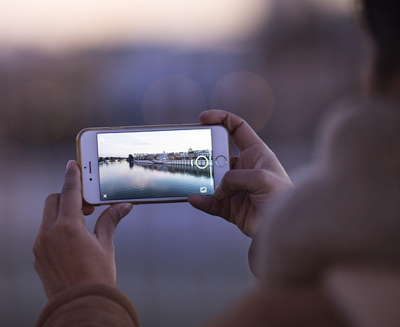
- iPhones (default format)
- Some Android devices
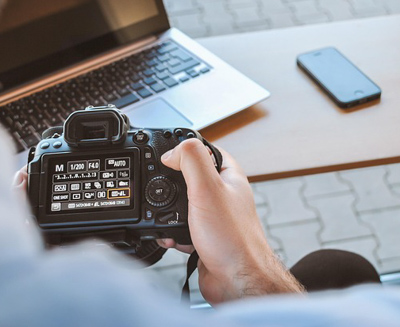
- Newer DSLRs and higher-end mirrorless cameras
If it’s available on your device:
- On smartphones, it appears as HEIC
- On cameras, it’s usually labeled HEIF
- In cameras, you’ll find it in the Image Quality settings menu
- On many cameras HEIF may activate automatically when:
- Shooting HDR or High Dynamic Range scenes (scenes that whave a wide range of tones from dark to light).
- Using in-camera HDR features
While HEIC is widely used on iPhones and some smartphones, it’s still more limited on most cameras. In many newer mirrorless and DSLR models, HEIF is used automatically in certain situations,such as HDR shootins, rather than as a format you can fully turn on or off.
HEIC vs JPEG: What’s the difference?
Both formats store high-quality images, but they differ in compression, image quality, and compatibility.
- Compression
- JPEG uses lossy compression, meaning every time you edit and resave the file, some data is lost. Over time, this can reduce image quality.
- HEIC uses a more advanced compression method, allowing images to be stored in significantly smaller file sizes without noticeable quality loss.
- Image quality - HEIC has a clear advantage in image quality:
 Supports 10-bit color (over 1 billion colors)
This results in smoother gradients, better skin tones, less banding in subtle tonal transitions- JPEG supports 8-bit color (16.7 million colors)
- HEIC also handles dynamic range more effectively.
- Compatibility - This is where JPEG still wins.
JPEG files are universally supported across:- Operating systems (Mac, Windows)
- Editing software
- Web browsers
- Social media platforms
- Printing labs
- HEIC files are less widely supported, which often adds extra steps. For example:
- HEIC files often need to be converted to JPEG before sharing or printing
- Windows users may need additional software to open HEIC files
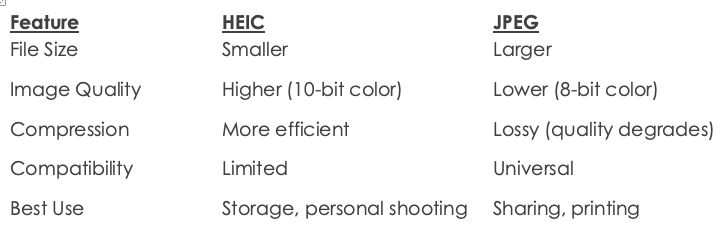
HEIC vs JPEG: Quick Comparison
Should you use HEIC or JPEG?
Here’s the practical answer for most photographers;
Use HEIC if: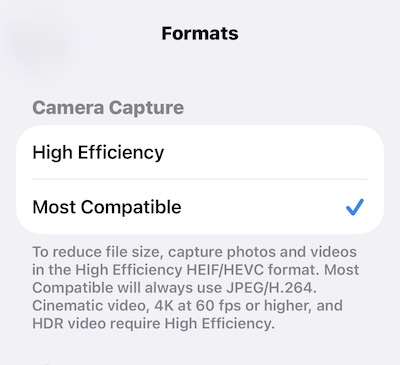
- You want smaller file sizes
- You primarily shoot on an iPhone
- You’re not regularly sharing or delivering images
- You don’t mind converting files when needed
Use JPEG if:
- You share images online, with friends, or across different devices
- You deliver images to clients
- You print your photos
- You want a simple, reliable workflow with no extra steps
If you want to change your iPhone to save photos as JPEG instead of HEIC
Go to: Settings → Camera → Formats → Most Compatible
Practical considerations
- JPEG is still the easiest format for:
- Social media and web use
- Client delivery
- Printing
- HEIC may introduce slight delays when shooting fast action (sports, wildlife) due to more complex processing
- If you’re shooting Raw only, this decision doesn’t matter
So which should you use?
If you want maximum compatibility and a simple workflow, JPEG is still the best choice. It works everywhere and no extra steps required.
HEIC/HEIF offers smaller file sizes and better image quality, but may require converting files before sharing or printing.
For most photographers, JPEG remains the more practical option... for now.