Creative Genius! Editing for Unique Images

We’ve all seen striking images and thought, “How did they do that?” So we Google it. We watch tutorials. We rewind… again and again. And somehow, even though we see the final image, key steps are missing or assumed. leaving us frustrated instead of inspired.
This class is designed to change that. We’ll explore four fun, outside-the-box editing techniques that will have people asking “How’d you DO that?” — and you’ll actually know the answer.
Techniques Covered
• Time Slice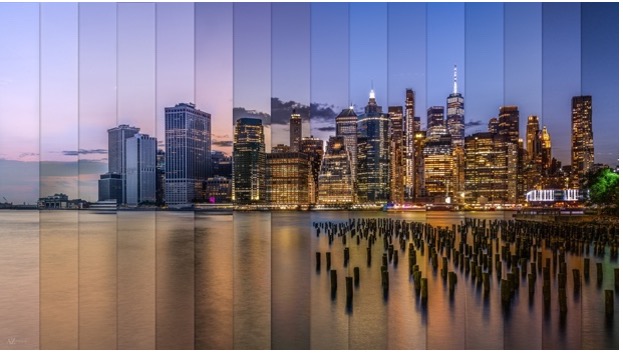
Similar to time-lapse photography, a time slice image shows the passage of time in a single photograph. You’ll learn how to properly capture the images and how to combine them into a finished time slice.
• Pep Ventosa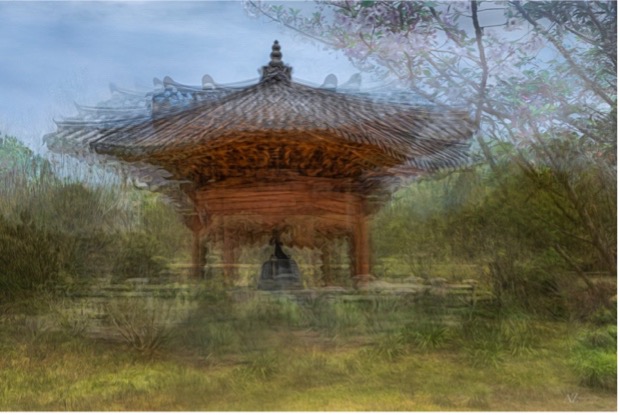
This technique creates an abstract, impressionistic image by layering multiple photos in Photoshop. We’ll cover how to shoot specifically for this style and how to blend the images into one cohesive piece.
• Mandalas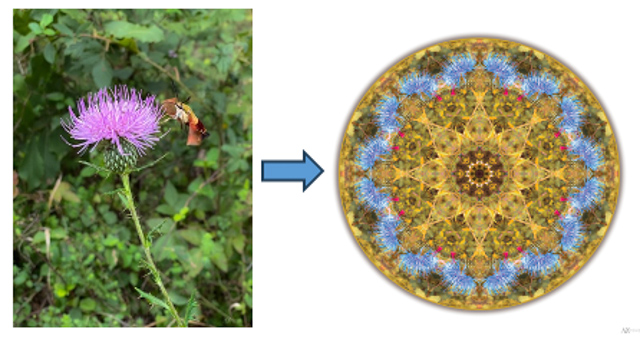
Using a simple, everyday image and a bit of Photoshop magic, you’ll transform it into an eye-catching, jaw-dropping work of art.
• Twirls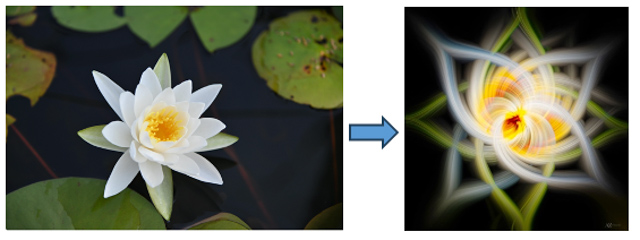
Through creative filters and image manipulation in Photoshop, you’ll distort photographs into swirling, other-worldly abstract images.
This class relies heavily on Photoshop, but don’t worry — no steps are skipped. Each technique will be demonstrated multiple times, and you’ll leave with a step-by-step handout so you can confidently recreate everything at home.
Join us and learn how to edit with less frustration, more creativity and techniques you’ll actually use.
Note - At the class you'll be working with the instructor's images. Bring your own laptop (desktops are fine too) loaded with Lightroom Classic and Photoshop. If you haven’t installed these, go to the Adobe website and choose the monthly subscription plan called “Lightroom.” Install the Lightroom Classic version prior the class. If you choose the Photography Plan instead, in addition to Lightroom Classic you will get Photoshop too.
Pre-requisite - This is not a beginner class. Participants should be familiar with Lightroom Classic and Photoshop. If you are not familiar with Lightroom Classic or Photoshop it is recommended you take the Lightroom Classic in a Day or Photoshop for Photographers classes first.
Questions can be directed to Marie Joabar at info@capitalphotographycenter.com
Class Limit: 8
What people are saying about Beth
I recently took a class with Beth and thoroughly enjoyed it. Beth is very organized, clear in instruction and makes photography fun.
Beth is a fantastic teacher. Her class was excellent as was her instruction!
I had so much fun in Beth’s Abstract class! She did a great job working with each of us and I loved what I captured. I’m going to set up a spot in my home to continue playing with these techniques. Thanks Beth!
I had a really good time and thanks for all of your help. I appreciated your thoughts on choosing subject matter and compositions as well. You were very attentive to our individual expectations and needs and I wanted to send this note of thanks!
Instructor: Beth Haubach

Beth joined Capital Photography as the Education Programs Manager in 2017 and we are now happy to have her as a talented instructor! She brings a long time love of photography with her having been bitten with the 'photo bug' back in her high school days.
Class Cancellation Policy
- A refund or a credit towards another class (less a $20 processing fee) can be given if cancellation notice is given more than 5 business days from the scheduled class.
- If there is no cancellation notice, or it is given 5 business days or less, no refund or credit will be given.
- Please check the name and date of the class carefully. Requests to reschedule a class will incur a $20 processing fee provided notice is given more than 5 business days prior to the class. If request to reschedule is given less than business 5 days prior to the class, no refund or credit will be given.
- If Capital Photography Center cancels or postpones a class due to weather or low enrollment, you can choose a full refund or a credit towards a future class.